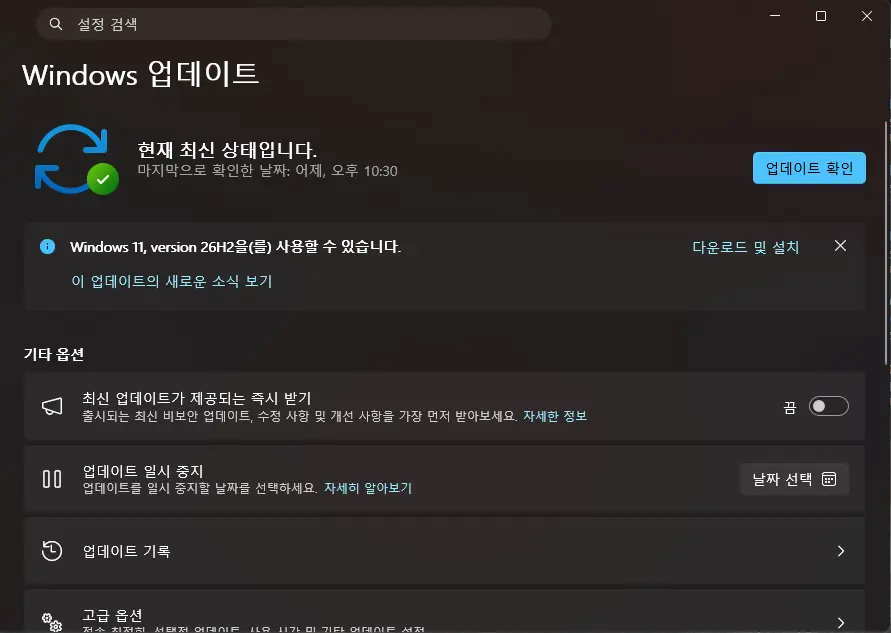
I knew that the Windows 11 26H2 update had been released, and I had also received a notification about it on my desktop PC. However, I kept putting off the installation.
The reason was that reports of errors following Windows 11 updates from Microsoft appear regularly. I had planned to install the 26H2 update once it had become reasonably stable.
However, after reading an article claiming that applying the Windows 11 26H2 update increases the amount of available memory, I decided to give it a try.
I would like to purchase additional physical memory to bring my system up to 16GB, but DDR4 memory prices have also risen significantly…
What’s Included in the Windows 11 26H2 Update
1. Security and Authentication
- Administrator Protection: Enhances security by restricting the use of administrator privileges.
- Built-in Sysmon: Supports security threat detection through system event logging.
- Smart App Control: Allows the feature to be turned on or off without resetting Windows.
- Improved Passkeys: Supports a plugin-based credential manager.
- Windows Hello: Provides enhanced login security with external fingerprint sensors.
- Driver Security: Strengthens driver trust policies.
- Post-Quantum Cryptography: Supports the ML-KEM and ML-DSA algorithms.
2. System Management and Recovery
- Settings Backup and Restore: Backs up and restores Windows settings and app lists.
- Windows Autopilot: Improves device enrollment and management for businesses.
- Point-in-Time Recovery: Restores the PC to a previous state using restore points.
- Quick Machine Recovery: Provides recovery options for troubleshooting system problems.
- Removal of Preinstalled Apps: Allows designated apps to be removed through policies.
3. File Explorer
- Supports AI-powered image editing and document summarization.
- Provides quick actions for files.
- Supports additional archive formats, including UU, CPIO, XAR, and NuGet.
- Retains folder-specific view and sorting preferences.
- Allows file names to be changed using voice input.
- Improves the launch speed and responsiveness of File Explorer Home.
4. Search and Start Menu
- Windows Search: Improves search result previews, app search accuracy, and result categorization.
- Folder Indexing: Automatically indexes frequently used folders.
- Start Menu: Supports app category and grid views, scrolling, and layout adjustments.
- Section Settings: Allows pinned apps, recent items, and all apps to be shown or hidden individually.
5. Taskbar
- Allows the taskbar to be repositioned to the top, left, or right of the screen.
- Allows the size of icons and the height of the taskbar to be reduced.
- Displays progress updates and completion notifications from supported AI agents.
6. Camera and Connectivity
- Multi-App Camera: Allows multiple apps to access a single camera stream.
- Bluetooth: Improves LE Audio, call quality, microphone mute synchronization, and reconnection stability.
- USB Displays: Improves the stability of displays connected through USB4 docks and hubs.
7. Accessibility
- Magnifier: Improves magnification settings, screen color adjustments, and notification features.
- Narrator: Improves Braille Viewer and Word document navigation.
- Voice Access: Improves natural language commands, adds support for more languages including Korean, and provides voice isolation capabilities.
8. Task Manager and IT Management
- NPU Monitoring: Displays NPU usage and dedicated/shared memory consumption by process.
- GPU Neural Engine: Displays related performance information.
- AppContainer: Allows users to check whether processes are running in an isolated environment.
- Script Security: Strengthens execution security for batch files and Command Prompt scripts.
9. Removed Features
- WMIC: No longer available in Windows 11 26H2, even as an optional feature.
Source: Microsoft Learn – What’s New in Windows 11, Version 26H2
I have summarized some of the features included in the Windows 11 26H2 update.
Windows 11 26H2 Update Review
So far, I haven’t encountered any problems since installing the update.
Immediately after booting, I felt that windows opened slightly faster and more responsively. However, I haven’t noticed much difference beyond that.
I also haven’t noticed any particularly new features from the update, which makes it difficult to feel a significant difference in everyday use.
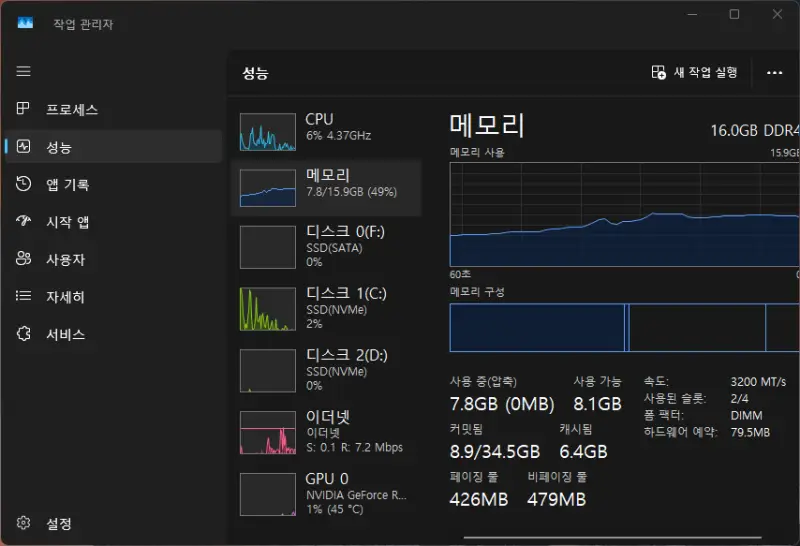

I’ve heard that the amount of available memory can increase by anywhere from 1GB to as much as 2GB. After installing the update, however, I found that available memory had increased by approximately 0.5GB.
An additional 0.5GB is certainly not insignificant, but I was expecting an increase of around 1GB, so I’m a little disappointed.
It looks like I might be able to free up more memory by carefully reviewing and trimming down the various startup programs.
Microsoft says that it intends to make Windows 11 run smoothly even on systems with 8GB of memory.
Personally, this is something I’m really looking forward to.
I hope the 26H2 update will be the starting point for that improvement.