iOS 27.2 Update – The Long-Awaited Siri AI Update
The rollout of iOS 27.2, which includes the long-awaited Siri update, has finally begun.
With Siri AI supporting Korean in iOS 27.2, it seems that it is finally time to say goodbye to the old, unintelligent Siri.
iOS 27.2 Update Size – iPhone 11 vs. iPhone 17
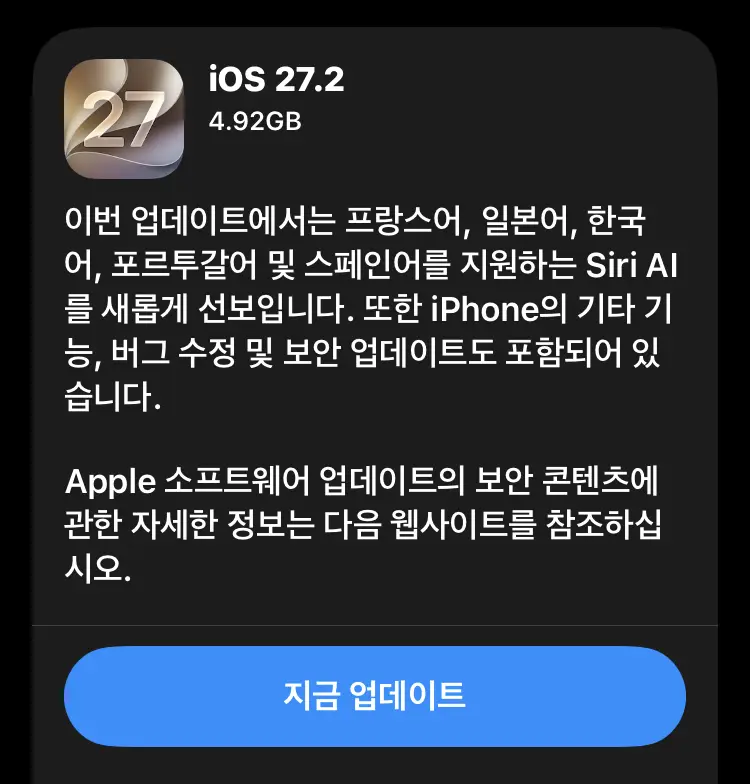
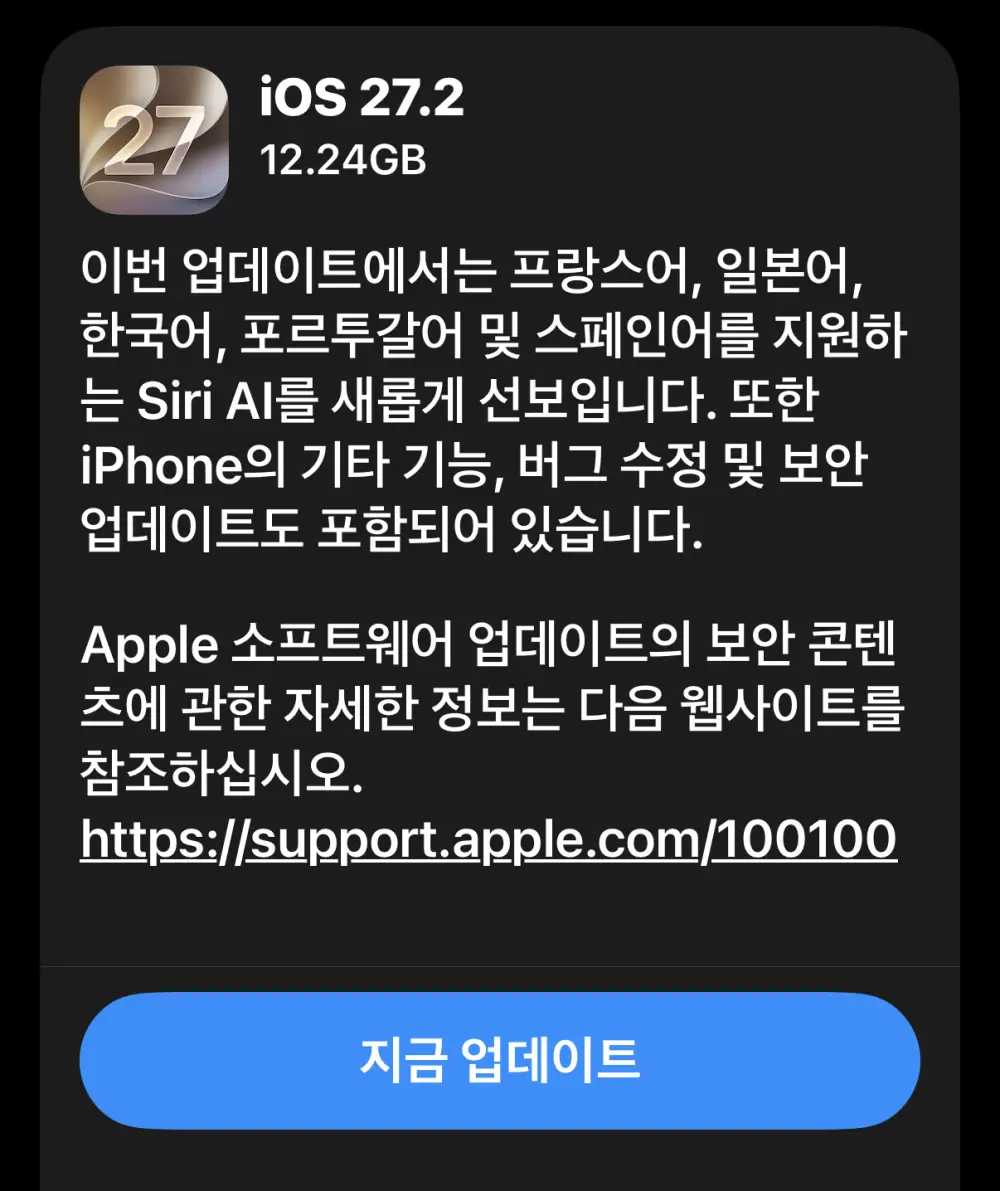
The iOS 27.2 update size is 4.92GB on the iPhone 11 and 12.24GB on the iPhone 17.
That is quite a significant difference in size.
It appears that Siri AI has been completely excluded from the iPhone 11, which does not support Siri AI.
Key Features of the iOS 27.2 Update
1. Siri AI Improvements
- Understanding Personal Context: Siri can find relevant information in messages, emails, photos, and other content to answer users’ questions.
- Integration Across Apps: It supports performing tasks across multiple apps and handling complex requests.
- Screen Content Recognition: Siri can use the content currently displayed on the screen to find relevant information and perform related tasks.
- Camera Integration: Users can ask questions about objects or surroundings viewed through the camera and obtain relevant information.
- Expanded Language Support: Siri AI supports Korean, Japanese, French, Portuguese, Spanish, and other languages.
Some Siri AI features may not be available depending on the supported device, language, or region.
2. Improvements to the Messages App
- Suggests relevant actions, such as adding calendar events, based on the conversation.
- Helps generate appropriate responses by understanding the context of conversations.
- Makes it easier to move to other apps or perform related tasks directly from messages.
3. Improvements to the Photos App
- Allows users to edit captions and comments in shared albums.
- Helps prevent duplicate photos from being added to shared albums.
- Displays notifications before shared albums expire, allowing users to save important photos and videos.
- Expands SynthID support to help identify images generated or edited using AI.
4. FaceTime Improvements
- Improves accessibility features related to video calls.
- Supports adding sign language interpreters or real-time caption providers to calls in supported environments.
5. Apple TV App Improvements
- Provides a personalized viewing experience through individual user profiles.
- Allows family members to have separate viewing histories and content recommendations.
- Supports watching multiple screens simultaneously for certain content.
6. Podcasts App Improvements
- Provides a dedicated section for discovering new episodes.
- Makes it easier to resume playback from where users previously stopped listening.
- Makes it easier to distinguish new content from previously played content.
7. Games App Improvements
- Allows users to check why certain friends are being recommended.
- Displays recently played games on friends’ player profiles.
8. Apple Music and Other Changes
- Changes the Apple Music app icon and some design elements.
- Improves overall system usability and stability.
9. Security Patches and Vulnerability Fixes
iOS 27.2 and iPadOS 27.2 include fixes for various security vulnerabilities that could affect the operating system and built-in apps.
The main areas addressed by the security updates include:
- WebKit: Fixes vulnerabilities related to memory corruption and potential arbitrary code execution when processing web content.
- Kernel: Fixes vulnerabilities related to system memory management, access control, and system stability.
- Privacy Protection: Addresses issues involving app permission checks and access to sensitive user information.
- Image Processing: Fixes security issues that could occur when processing maliciously crafted image files.
- Mail: Addresses an issue that could expose a user’s actual email address when using Hide My Email.
- Other System Components: Fixes vulnerabilities related to data access control, operating system security, and stability.
Detailed information about individual vulnerabilities and affected components is available on Apple’s official security information page.
Official Security Information: iOS 27.2 and iPadOS 27.2 Security Content
What Happens to Siri AI After Installing iOS 27.2?
After completing the update, I called Siri, but there was no noticeable difference.
I wondered, “What exactly has changed?” and started looking around. Then, when I went to Settings > Siri, I came across a strange option that said “Apply to Join the Siri AI Beta.”
Is it still in beta? Do I even have to apply to join before I can use it?
I decided to apply anyway. After submitting the application, I was told that it would be rolled out when my turn came.
I found that a little absurd, but I decided to wait.
Then, just before going to bed, I picked up my iPhone and noticed a new icon on the screen.
It was the Siri app.
After checking the changes and calling Siri again, I noticed something moving at the top of the screen.
Siri had finally changed to the new Siri AI.
I tried giving it a few simple commands and confirmed that its responsiveness had improved considerably.
iOS 27.2 Update Review
The biggest changes appear to be Siri AI and the security patches.
When I asked Siri AI to find a particular photo stored on my iPhone, it found it quite well.
Since it can also recognize what is displayed on the screen, I expect it will have a wide range of uses in the future.
I will have to try out its features one by one.
However, Siri AI takes up 6.36GB of storage space.
You can check how much storage Siri AI uses by going to Settings > General > iPhone Storage > iOS.
For reference, Siri AI takes up just 8KB on the iPhone 11.
Another important part of this update, just as important as Siri AI, is the security patches.
I started scrolling through Apple’s security update information page, but eventually gave up.
Apparently, the update includes security fixes for more than 160 items.
I suspect this may reflect security issues being discovered with the help of AI these days.
The iPhone 11 does not receive Siri AI, but it can still receive the security updates. Therefore, I do not think it is a good idea to skip the update simply because Siri AI is not available on the device.
Finally, iOS 27.2 reportedly includes other new and improved features beyond those mentioned above.
It also includes features for the iPhone Duo and updates related to CarPlay. I will have to explore these changes as I continue using the updated software.